SimCom X Pilot
Use your simulator's radio stack to switch voice frequencies automatically. COM1 and COM2, distance-aware audio and active ATC discovery.
View Pilot Client →Voice communication that follows your aircraft radios, plus radar tools for virtual controllers. Built for pilots, ATC and multiplayer groups.
Use your simulator's radio stack to switch voice frequencies automatically. COM1 and COM2, distance-aware audio and active ATC discovery.
View Pilot Client →A virtual communications panel for controllers, including radio, coordination calls and ATIS support for SimCom X pilots.
View ATC Client →Display simulator and JoinFS traffic on EuroScope, VRC and Aurora-compatible workflows, with cross-platform support.
View Radar Tools →Tune COM1 or COM2 in the simulator and let SimCom X follow.
Audio can become quieter with distance and altitude for a more radio-like experience.
Keep Discord or another voice app for group chat while using SimCom X for aviation radio.
Use the main SimCom X network or configure private group-server operation.
DotDash.Space apps are cross-platform and run on Windows, Linux and macOS, provided the required .NET 10 runtime is installed.
Install the .NET 10 runtime before starting the apps. The step-by-step guide below covers Windows, Linux and macOS.
Our applications are cross-platform and require .NET 10 to be installed. You normally only need the runtime to run the applications; the SDK is intended for developers. Download .NET 10 from Microsoft's official download page.
Download .NET 10 from Microsoft
.exe file.dotnet --list-runtimes.Microsoft.NETCore.App 10.x entry. If the application requires the desktop runtime, also look for Microsoft.WindowsDesktop.App 10.x.Alternative: with WinGet, you can install the .NET 10 Desktop Runtime using winget install Microsoft.DotNet.DesktopRuntime.10.
sudo apt-get update.sudo apt-get install -y aspnetcore-runtime-10.0. If the application only needs the standard .NET runtime, use sudo apt-get install -y dotnet-runtime-10.0.dotnet --list-runtimes.10.x version of Microsoft.NETCore.App is listed.Alternative: Microsoft also provides an official dotnet-install.sh script for scripted or non-admin installations. This is useful when your distribution's package manager is not suitable.
dotnet --list-runtimes.Microsoft.NETCore.App 10.x runtime is listed.Microsoft's macOS documentation provides the current supported macOS versions and separate instructions for Intel (x64) and Apple silicon (Arm64) Macs.
dotnet --list-runtimes. If you only have .NET 8 or .NET 9 installed, you still need the .NET 10 runtime because the applications target .NET 10.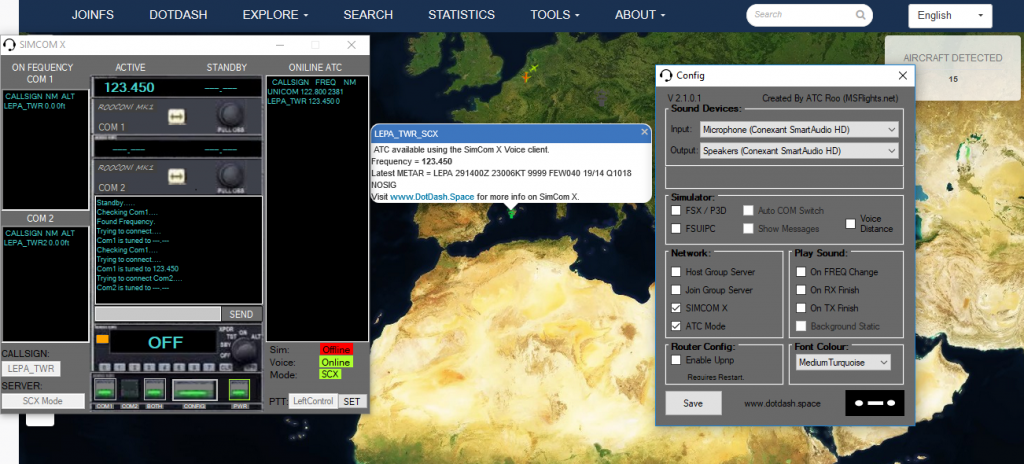
I created this site to host the SimCom X flight simulator multiplayer voice chat and ESJFS ATC software, that I write in my spare time for flight simulators such as MS2020, FSX, P3D, XPlane and FS9.
The SimCom X Pilot voice client is a lightweight, standalone voice client that automatically switches radio channels using the aircraft radio stack. It also adjusts received audio quality according to distance and altitude. SimCom X Pilot is available for Windows, Linux and macOS (OS X), and connects to Microsoft Flight Simulator X (FSX), Prepar3D (P3D), X-Plane and FlightGear.
The SimCom X ATC voice client is a cross-platform virtual communications control system (VCCS) for virtual air traffic control, available for Windows, Linux and macOS (OS X). The system provides a way to not only communicate with aircraft using the SimCom X Pilot Client, but users are also able to conduct phone calls to other controllers using the ATC client for controller-to-controller coordination. Controllers can connect to the public SimCom X network or use private Group Server mode for closed-group operations when privacy and controlled access matter. The SimCom X ATC client also includes an ATIS, enabling pilots using the SimCom X pilot voice client to hear controller-entered runway, weather and operational information on the ATIS frequency.
One of the first plugins I wrote, the Teamspeak 3 SimCom Plugin creates a way for users to autoswitch channels on a TeamSpeak 3 server, when tuning the radio stack in FSX or P3D.
ESJFS stands for EuroScope JoinFS and is a tool that displays traffic other than VATSIMs on to EuroScope or VRC. Originally written for ATC using the JoinFS network, ESJFS has the option to gain data from either JoinFS or Flight Simulators such as FSX, P3D (via SimConnect), XPlane and FS9 (using FSUIPC or XPUIPC). More info can be found on the Radar tools page.
Feel free to have a look around my little site and please do leave a comment below letting me know if any of my tools have been of use to you.
Roo